
Money App - Cash Advance
PRG Ventures.Finance
4.22.45K Reviews
- Version
- 2.48.0
- Installs
- 500.00K
- Age Rating
- Everyone
Screenshots
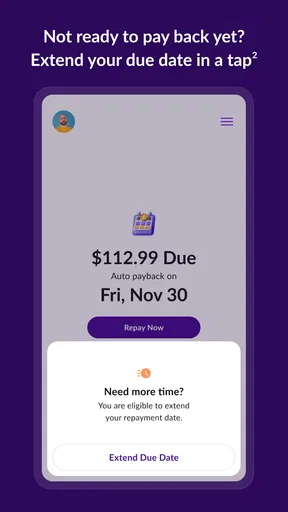
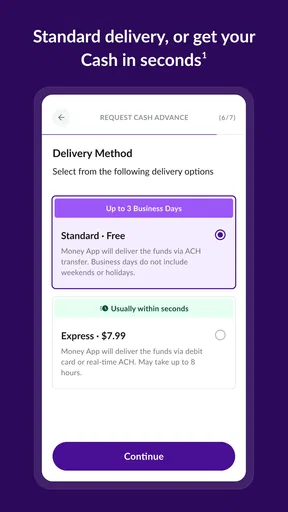
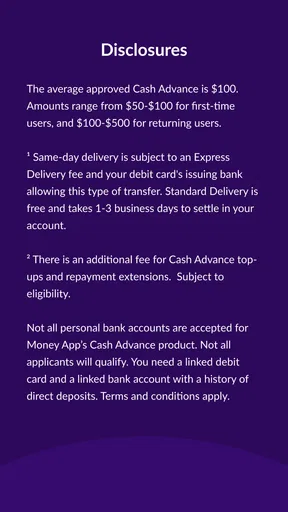

Our Review of Money App - Cash Advance
 Analysis by Appyee
When an unexpected bill lands between paydays, the hardest part is often not finding an app but understanding exactly what it can do for you. Money App - Cash Advance is built for that narrow moment: it is a finance app from PRG Ventures that helps users look for emergency cash through a mobile workflow. I approached it as a short-term financial tool rather than a general budgeting companion, and that distinction matters from the first screen.
The app is free to install and has an Everyone content rating, so it is easy to try on compatible Android devices. It has reached over 500 thousand installs and holds an average rating of 4.2 from around 10 thousand ratings, with roughly 2.4 thousand written reviews. Those figures suggest that many people find the basic experience useful, although they should not be mistaken for a promise that every applicant will receive money or receive the same terms.
How the basic emergency-cash workflow feels
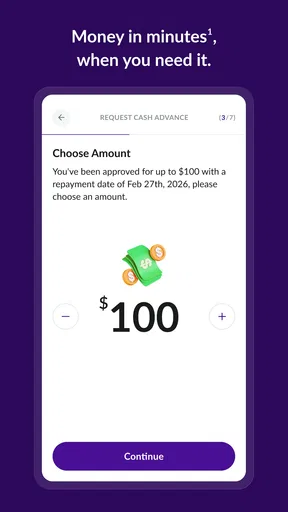
My first recommendation is to treat the application as a guided request process, not as a guaranteed payday. The sensible baseline workflow is to open the app when a genuine shortfall appears, read each screen carefully, enter information accurately, and review the final details before accepting anything. That sounds obvious, but it is especially important with cash-advance products because speed can make people skim the parts that affect repayment.
The store summary presents it as a way to get emergency cash, but the useful question is whether it fits the specific gap you are trying to cover. A small, one-time problem such as a necessary household purchase or an urgent bill is a different situation from repeatedly using advances to cover ordinary living costs. I would use the app only after identifying the exact amount needed and the date on which I expect to be able to manage repayment.
One practical habit makes the process safer: write down the amount you need before opening the application. That prevents the familiar mistake of requesting more simply because a larger figure appears available. I would also keep the relevant income and account information nearby, not because the app should be rushed, but because entering inconsistent details can create unnecessary friction during an application.
Money App - Cash Advance is not a replacement for a bank account, a full budgeting service, or a long-term debt plan. Its value is concentrated in access and convenience. If you are looking for spending categories, savings goals, investment tools, or detailed monthly reporting, this is the wrong type of finance app. If your immediate question is whether a cash-advance route is worth exploring from a phone, it is more relevant.
What I would check before relying on a request
I would never make a rent, utility, or medical decision based solely on the expectation that an advance will arrive. The application may help you explore an option, but the result of a request and the timing of funds are separate matters. A responsible workflow leaves a backup plan, even if that backup is simply contacting the bill provider before the due date.
Another useful step is to read every offer or repayment detail as a complete package. Focus on what you will repay, when repayment is expected, and whether the arrangement solves the original problem without creating a larger one next week. If the numbers feel difficult to explain in one sentence, I would pause rather than accept immediately.
This is also where the app’s free price needs context. Free installation does not mean that every financial transaction connected with a cash advance is cost-free. The app itself can be downloaded without paying for the download, but users should judge any displayed terms inside the financial flow instead of assuming that “free” describes the entire borrowing experience.
Settings and account habits worth checking
Experienced users do not simply open a financial app and tap through it. They first look for account, notification, security, and communication settings that affect how they use it. I would check whether notifications are useful or distracting, make sure contact details are current, and review any available security controls before starting a request. I would also avoid leaving sensitive financial information visible on a shared device.
Keeping the application updated is another sensible habit. The current version is 2.48.0, and the minimum operating-system requirement is Android 7.0. That makes it accessible to many older Android phones, but compatibility alone is not a reason to ignore updates. A current installation is generally the better starting point when dealing with account access or financial forms.
I would also confirm that the phone is the device I actually control. Avoid completing a request over an unsecured public connection, and do not let someone else fill in financial details on your behalf unless you can verify every entry. These are not glamorous tips, but they reduce the risk of mistakes more effectively than trying to move through the app as quickly as possible.
Notifications deserve a little thought. An alert that reminds you to review an account or follow up on a request can be useful; a constant stream of promotional or repetitive messages can make important information easier to miss. My preference would be to keep essential account alerts enabled while reducing anything that does not help me track an active financial task.
Faster patterns that still keep control
The fastest safe pattern is repeatable preparation, not blind tapping. I would keep a simple note with my monthly income date, fixed bills, and the amount available after essentials. When an emergency occurs, that note lets me decide whether a cash advance addresses a temporary timing issue or merely hides a permanent shortfall.
A second useful pattern is to separate “application time” from “decision time.” I can review the available route, close the screen, and return after checking my own budget. This small pause is valuable because a fast mobile interface can create a feeling of urgency even when the financial decision deserves more time.
For a realistic example, imagine that a necessary expense arrives a few days before income is available. I would first confirm the exact gap, check whether the bill can be moved or split, and then use the app to explore an advance only if the repayment plan fits the next income cycle. Afterward, I would mark the expected repayment in my calendar and avoid treating the remaining balance as spare spending money.
That approach also shows where the app is strongest. It can be convenient for someone who already knows the size and purpose of a short-term need and wants to investigate an option from a phone. It is less suitable for someone who is unsure how much they owe, has several overdue obligations, or needs help building a sustainable financial plan.
Compared with asking a traditional bank for a personal loan, a cash-advance application may feel more direct for a small, immediate gap. A bank may be better for a larger planned expense, a longer repayment period, or a customer who wants a broader relationship with one financial institution. Compared with borrowing from friends or family, the app offers privacy and a structured digital process, while personal borrowing may avoid some formal application steps but can create its own social pressure.
A budgeting app is another different alternative. It will not necessarily solve today’s shortage, but it can reveal why shortages keep appearing. If the same emergency happens every month, I would choose budgeting support, a conversation with creditors, or professional financial guidance before repeatedly turning to advances. The most important trade-off is convenience today versus flexibility in the next pay cycle.
Where advanced use reaches its limits
The app should not be treated as an unlimited emergency fund. Availability, eligibility, timing, and terms can affect whether it is useful in a particular situation. Because of that, I would avoid planning around a specific amount until the application has actually shown the relevant details and I have read them carefully.
There is also a psychological limit. Once a person has used a quick advance successfully, it becomes tempting to make the same choice for less serious purchases. I would set a personal rule that the app is reserved for essential, time-sensitive needs and not for entertainment, impulse shopping, or expenses that can wait. That rule is more valuable than any shortcut inside the interface.
Users should also be realistic about repeated use. Even when one advance appears manageable, several overlapping obligations can make the next pay cycle uncomfortable. I would finish tracking one commitment before considering another and would stop using the app if repayment leaves too little for housing, food, transport, or other essentials.
Privacy is another reason to slow down. A finance app naturally involves sensitive information, so I would read the relevant screens, use a device lock, and avoid sharing screenshots that expose account or personal details. I would not grant access casually or assume that convenience makes every permission worthwhile. If the process feels unclear, that is a reason to investigate further before continuing.
The age rating of Everyone makes the app broadly presented for general audiences, but financial responsibility is still an adult concern in practice. A low age label should not be read as evidence that borrowing is appropriate for every user. Anyone considering an advance needs enough understanding to assess repayment and the consequences of missing it.
Who will get the most from it
I see Money App - Cash Advance working best for a user who wants a focused emergency-cash option, prefers handling the initial process on a smartphone, and can make a clear repayment plan before accepting anything. The free download lowers the barrier to exploring the service, while the familiar mobile format may feel less intimidating than starting with a formal bank appointment.
It may also suit someone who values a repeatable checklist. Open the app, identify the exact shortfall, enter accurate information, inspect the terms, pause, and then decide. That process prevents the tool from becoming an automatic response to every financial inconvenience.
I would advise a different route for someone with unstable income, existing overdue debt, or no realistic repayment date. The same applies to anyone searching for credit-building education, debt consolidation, savings automation, or a complete household-money dashboard. A narrow tool can be useful precisely because it stays narrow, but that also means it cannot replace broader support.
My final assessment after using it as a practical tool
PRG Ventures has positioned this as a straightforward finance app for people exploring emergency cash, and that focus is its clearest strength. The experience makes sense when the need is temporary, the amount is understood, and the user is willing to inspect the details rather than chase speed. Its presence on Android 7.0 and newer devices also makes it approachable for people who do not own a recent phone.
My reservation is not that the app exists; it is that cash advances can be easy to normalize. The application can help with a timing problem, but it cannot repair an income-and-expenses imbalance. I would use it as a carefully considered option, not as part of my regular monthly budget.
Overall, I would recommend trying Money App - Cash Advance only when you have a specific emergency, a clear repayment plan, and enough patience to read the offer before accepting it. For that situation, it is a practical app to investigate. For ongoing financial pressure, a bank conversation, creditor arrangement, budgeting system, or qualified adviser is likely to be the better next step.
Its current release, version 2.48.0, is worth approaching with the same mindset as the rest of the product: keep the software current, keep your information accurate, and keep your financial decision bigger than the button on the screen. That is the habit that turns a convenient emergency tool into a controlled one rather than an expensive routine.
Verdict
Strengths of Money App - Cash Advance
- Fast application process with a simple, user-friendly interface.
- May help cover unexpected expenses before your next payday.
- Repayment details are shown clearly before accepting an advance.
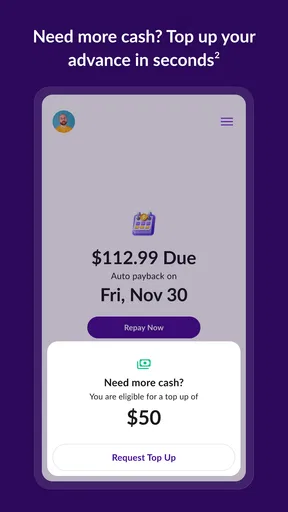
- Available balance and payment information are easy to track.
- Useful notifications can help users remember upcoming repayments.
Limitations of Money App - Cash Advance
- Approval and advance amounts may vary based on individual eligibility.
- Service availability may be limited by state or region.
- Some features may require access to personal financial information.
- Late or missed payments could lead to additional costs or account issues.
- The app may not be suitable for users seeking long-term financial support.
Similar Picks in This Category
View All
Google Wallet
Google LLC4.3

Airtel: Recharge, Bank & Loans
Airtel4.0

PayPal - Pay, Send, Save
PayPal Mobile4.2

DANA Indonesia Digital Wallet
PT Espay Debit Indonesia Koe4.5

Binance: Buy Bitcoin & Crypto
Binance Inc.4.8

Cash App
Block, Inc.4.7
Frequently Asked Questions
What is Money App - Cash Advance, and how does it work?
Money App - Cash Advance is designed to help eligible users request access to a small amount of money before their next paycheck. After creating an account, you may need to provide personal, employment, income, and banking information so the service can evaluate your request. Approval, available amounts, transfer times, and repayment conditions depend on the provider, your profile, and applicable local requirements.
Is Money App - Cash Advance a loan, and how much does it cost?
The app may connect users with a cash advance service, lender, or financial provider, so the product should not automatically be considered free money. Depending on the offer, you could encounter subscription charges, express-transfer fees, interest, finance charges, or other costs. Before accepting anything, carefully review the annual percentage rate, total repayment amount, due date, and all terms shown in the agreement.
Who can use Money App - Cash Advance?
Eligibility is generally based on factors such as age, residency, a valid identification document, a regular source of income, an active bank account, and the ability to verify your information. Meeting these basic conditions does not guarantee approval. Requirements can vary by state or country and may change over time, so applicants should read the current eligibility rules inside the app before submitting personal details.
How quickly can I receive money through the app?
The time required to receive funds depends on the review process, your bank, the selected delivery method, and whether you pay for an expedited transfer. Some requests may be processed quickly, while others can require additional verification or may be declined. The app should display an estimated arrival time, but this estimate is not a guarantee, particularly on weekends, holidays, or during banking delays.
Is Money App - Cash Advance safe to use?
Using any cash advance application requires careful attention to privacy and repayment terms. Download the app only from an official store, confirm the developer’s identity, and review the permissions requested before registering. Avoid sharing passwords, verification codes, or banking credentials outside the secure app. Also check the privacy policy, customer-support options, cancellation rules, and repayment schedule before authorizing access to your financial information.
